A Skill in Claude Code Is Convenient. Right-Click Without Claude Is Even BetterСкилл в Claude Code — удобно. Правый клик без Claude — ещё удобнее
According to joint research by Qatalog and Cornell University (2021, Workgeist Report), the average office worker switches between apps about 1,200 times a day. Gloria Mark from UC Irvine measured that returning to a task after each such switch takes an average of 23 minutes.
→ It pays to solve tasks within a single interface.
That’s why I wrap most repetitive tasks into skills and handle them from the terminal in my IDE.
Fitts’s Law (Paul Fitts, 1954): the closer the target is to the cursor, the faster you can reach it. A context menu appears right at the cursor. Distance = 0. Physically, it doesn’t get faster than that.
→ And this is a relatively new approach for me (or maybe a long-forgotten old one) — adding commands to the right-click context menu. It’s incredibly convenient.
Two commands that used to live in my skills recently made it into the context menu as well.
LLMs constantly generate files in Markdown. On Mac I have QLMarkdown — an open-source app that renders .md files beautifully and error-free right in QuickLook. But when I share files with others, they don’t have it, and .md is a pain to read. So before sending, I convert to PDF. And honestly, I spent a long time trying to get quality .md-to-PDF rendering working — my research didn’t turn up a single working solution, so I built my own, though not on the first try.
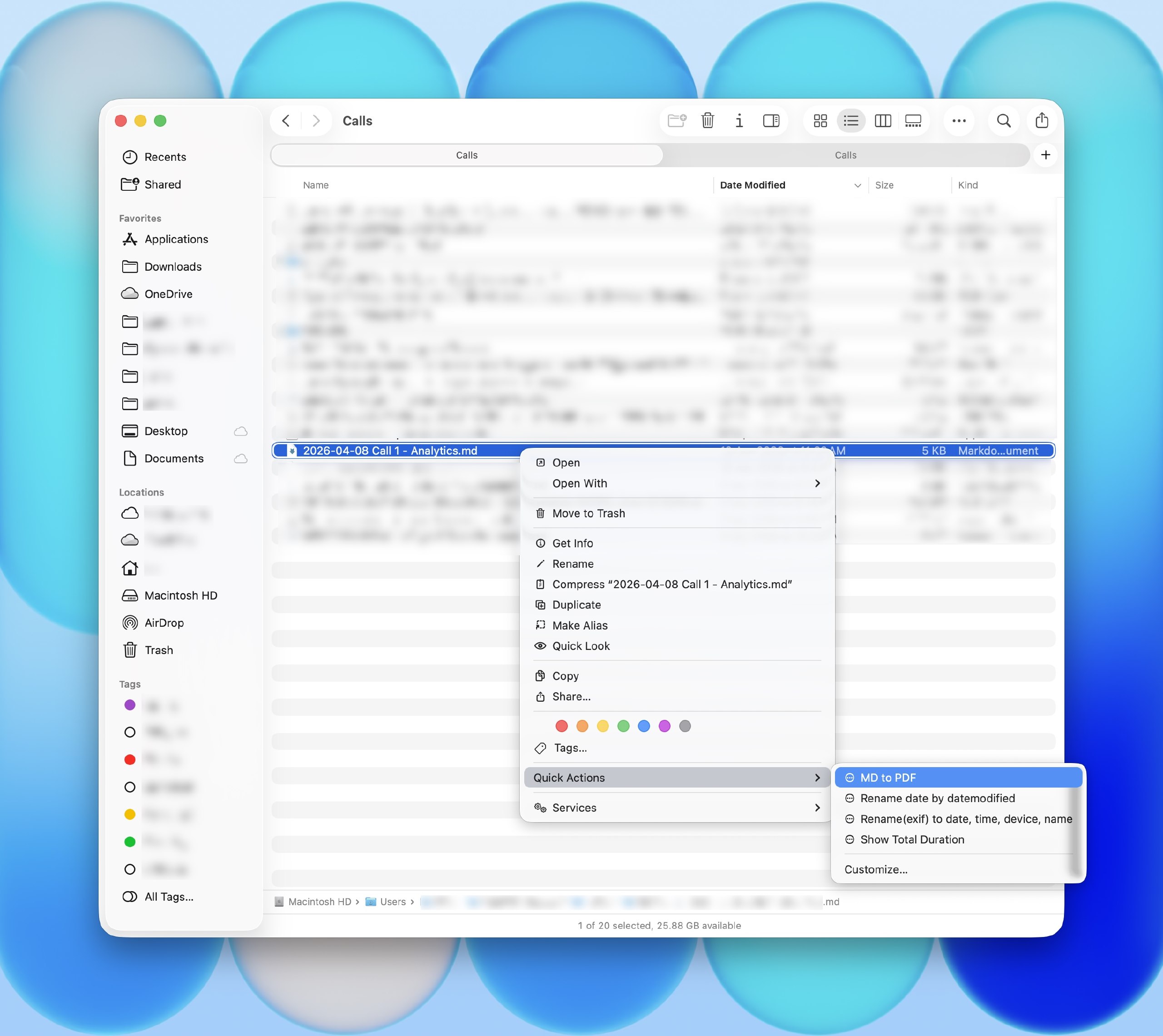
Before, I could only render via a skill in the LLM (meaning I had to provide a file link, specify the skill, and ask it to make a PDF). Now I just right-click in the folder → Quick Actions → MD to PDF, 2–3 seconds, and the file is ready. It feels like magic in everyday life.
I have automated pipelines for transcribing recurring calls (plus my own code, optimized for M-series chips, for local transcription on my MacBook). For one-off calls from various apps, there was no pipeline — I’d have to open the Whisper UI, select a file, pick a model. Now it’s just right-click → Transcribe Audio, and I can watch the progress percentage in the terminal. Incredibly convenient.
Transcription loads about 5 GB of RAM, and I have a 16 GB MacBook — so I kick it off right before stepping away from the computer for 10 minutes, otherwise the machine starts lagging a bit. Usually an hour-long call transcribes in about 6 minutes.
Copy the repo links, paste them into your LLM, and ask it to create a skill and add it to the context menu. I use this on Mac, but I also asked Codex to adapt it for Windows — haven’t tested it though, there might be bugs. Experience the magic every day! 🪄
P.S. Apple in macOS Tahoe 26 is doing the same thing — embedding AI directly into Shortcuts and the context menu. Apparently I’m not the only one who thinks this is useful 🙂
По данным совместного исследования Qatalog и Cornell University (2021, Workgeist Report), средний офисный работник переключается между приложениями около 1200 раз в день. Gloria Mark из UC Irvine измерила: на возврат к задаче после каждого такого переключения уходит в среднем 23 минуты.
→ Выгодно решать задачи в рамках одного интерфейса.
Поэтому большинство повторяющихся задач я оборачиваю в скиллы и решаю из терминала в IDE.
Закон Фиттса (Paul Fitts, 1954): чем ближе цель к курсору, тем быстрее до неё добраться. Контекстное меню появляется прямо на курсоре. Расстояние = 0. Физически быстрее не бывает.
→ А это для меня относительно новый подход (ну или давно забытый старый) — добавлять команды в контекстное меню под правой кнопкой мыши. Как же это удобно!
Две команды, которые жили у меня в скиллах, недавно появились и в контекстном меню.
Markdown → PDF
LLM постоянно генерирует файлы в Markdown. На Mac у меня стоит QLMarkdown — open-source программа, рендерит .md файлы красиво и без ошибок прямо в QuickLook. Когда же я шарю файлы другим, то у них нет такой программы и .md читается с трудом. Поэтому перед отправкой я конвертирую в PDF. Да, и кстати, долго бился, пока смог научить качественно рендерить .md в pdf, мой ресерч не нашел ни одного рабочего решения, поэтому я запилил своё, но далеко не с первой попытки.
Раньше я мог рендерить только через скилл в LLM (т.е. надо давать ссылку на файл, указывать скилл и просить сделать pdf). Теперь же просто в папке правый клик → Quick Actions → MD to PDF, 2-3 секунды и файл готов. Это ощущается магией в повседневной жизни.
Транскрибация аудио
У меня настроены автоматические пайплайны для транскрибации регулярных звонков (и собственный, оптимизированный под M-чипы, код для транскрибации локально на макбуке). Для разовых звонков из разного ПО пайплайна нет — приходилось открывать интерфейс с программой Whisper, выбирать файл, выбирать модель. Теперь правый клик → Transcribe Audio, в терминале виден прогресс в процентах. Невероятно удобно.
Транскрибация грузит ~5 ГБ оперативки, у меня MacBook 16 ГБ — запускаю прямо перед тем, как встать от компьютера на 10 минут. А то комп чуть-чуть начинает подтупливать. Обычно за 6 минут транскрибируется час звонка.
Копируйте ссылки на репо, вставляйте в свои LLM и просите создать скилл и добавить в контекстное меню. Сам юзаю на маке, но также попросил Codex адаптировать под Windows, правда я не тестил, могут быть ошибки. И испытывайте каждый день магию как и я! 🪄
P.S. Apple в macOS Tahoe 26 делает то же самое — встраивает AI прямо в Shortcuts и контекстное меню. Видимо, не один я считаю, что это полезно 🙂